Airtel free PC internet...


just connecct mobile with pc via pc suite,

put apn airtelgprs.com now open any browser and 
put address 
125.21.241.77.proxytea.appspot.com/ ur site NAME without http
for example: 

125.21.241.77.proxytea.appspot.com/www.google.com 

Or


Hello Friends,
Once again airtel free gprs in pc. for free gprs follow these settings.

Step 1:- Connect your mobile to pc suite. 
Apn:- airtelfun.com
.
Step 2:- after connected mobile to pc suite.open the Dotproxy.
Step 3:- In DotProxy Do these settings

Local Port:- 1234
Remote Proxy: 100.1.200.99:8080(port)
and CheckBox in tunnel HTTP through HTTPS.
Leave all the things empty.
and click Start. 

Step 4:- Now in your Browser do these settings-

ip:-127.0.0.1(localhost):1234(port)

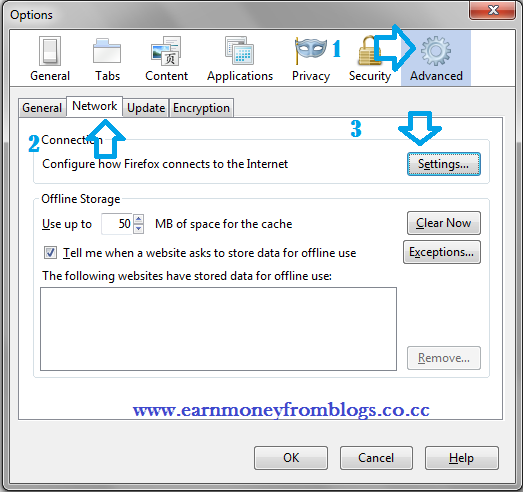
For mozila the settings are below:-
Visual Basic 6.0 Ebooks collection: Download for free


20 - Visual Basic 6.0 EBOOKs Collection download for free

Microsoft Visual Basic 6 Video Tutorials.part3

Microsoft Visual Basic 6 Video Tutorials.part2

Microsoft Visual Basic 6 Video Tutorials.part1

Visual Basic 6 Database How-To

Database Access with Visual Basic

Visual Basic and COM+ Programming BY EXAMPLE

Visual Basic 6 Database How-To

MCSD Visual Basic 6 Training Guide

Upgrading Visual Basic 6.0 to VB.NET

Visual Basic 6 Blackbook

Professional Visual Basic 6 Project Management

Complete Idiots Guide To Visual Basic 6

Programming Desktop Applications With Microsoft Visual Basic6 MCSD Training Kit

Teach Yourself Visual Basic 6 in 21 Days

Visual_Basic_6_Blackbook

Programming Microsoft VB 6

VB6 Programming Blue Book

Visual Basic 6 Database How To

Upgrading Visual Basic 6.0 to VB.NET

Learn Visual Basic 6.0

Blogger Widgets